Preparing Your Python Code with FastAPI
Before deploying your FastAPI application, it's essential to prepare it according to the platform's guidelines.
Here is an example Python Sample
Selecting Your Language
Confirm the project is developed in Python.
Packaging Your Project
To package a FastAPI application, organize your project as follows:
my_project/
│
├── main.py  # Your main FastAPI application file.
│
├── requirements.txt  # Optional: Dependencies must be built locally, uploaded and referenced as an immutable volume
│
└── additional_files/  # Optional: Any additional files or directories.
    ├── __init__.py  # Optional: Init file.
    ├── models.py  # Optional: Defines data models.
└── dependencies.py # Optional: Contains any dependency functions.- Main File: Place the main FastAPI file (main.py), containing the application instance and routes, at the package's root.
- Dependencies: List FastAPI and other dependencies in
requirements.txt. Example content:fastapi==0.68.0 uvicorn==0.15.0 - Compression: Compress your project directory into a
.zipor.squashfsfiles - one for the project itself and another for the packages.
Below is an example of how to create and compress your package using squashfs.
pip install -t packages -r requirements.txt
mksquashfs packages packages.squashfs
Defining the Entry Point
The entry point is vital for the platform to recognize how to launch your FastAPI application. For a main file named main.py:
- Entry Point: Your entry point would be
main:app, wheremainis the filename (without.py) andappis the FastAPI application instance.
Example Code Explanation
Here is the explanation of your code snippet:
from fastapi import FastAPI

app = FastAPI()
@app.get("/")
async def root():
return {"message": "Hello World"}- FastAPI Instance:
app = FastAPI()creates an instance of a FastAPI application. - Route Definition:
@app.get("/")defines a route that listens for GET requests at the root URL (/). - Async Function:
async def root():is an asynchronous function that handles requests to the root URL. It returns a JSON response with a message. - JSON Response:
{"message": "Hello World"}is the JSON response that clients will receive when they access the root URL.
Uploading Your Code
After preparing your code, follow the platform's upload process:
- Navigate to Code Upload: Access the code upload section by initiating a new function on the platform.
- Choose File: Select your
.zipor.squashfsfile containing the FastAPI project. - Select Language: Choose Python as the language.
- Specify Entry Point: Enter
main:appas the entry point. - Upload: Complete the upload process.
Set a volume
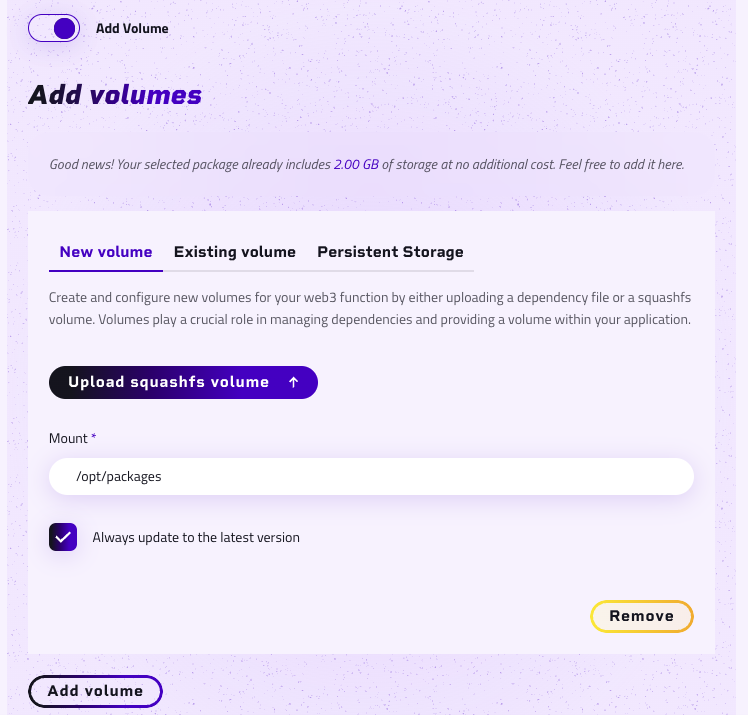
After uploading your project, you need to manually push your dependencies into a dedicated volume.
The dependencies will not be installed automatically, so you must install and upload them yourself.
To do this, navigate to the Volume section and add a new volume at /opt/packages.
Make sure to use the correct name for the volume to avoid errors during deployment.